Tell me the time: A Minimal Agent Loop
agent learning 01
2026-05-29
0. Preface (Nothing technical, feel free to jump)
Finally, I graduated as a master student in Germany 😮💨. While working on my thesis, I was always fascinated by the rapid changes in AI, especially agents (almost every day, or every few days, Claude and Claude Code release a new version). Since there is no more mandatory deadline in front of me, mindless scrolling and playing video games just can't fill my empty, shallow spirit. More importantly, there is no excuse not to learn and apply for jobs.
Last week, I came across a Hackathon on Devpost held by Google Cloud. In this event, the goal is to build an agent system. The requirements are easy: use Google Cloud Agent Builder and choose one of their partners' MCP in the project.
Enough bullshit. Agent-Learning-Hub is a perfect GitHub repo I found that has everything you need to learn about agents. This post is about my first learning outcome in building a minimal agent loop.
1. LLMs don't know the time
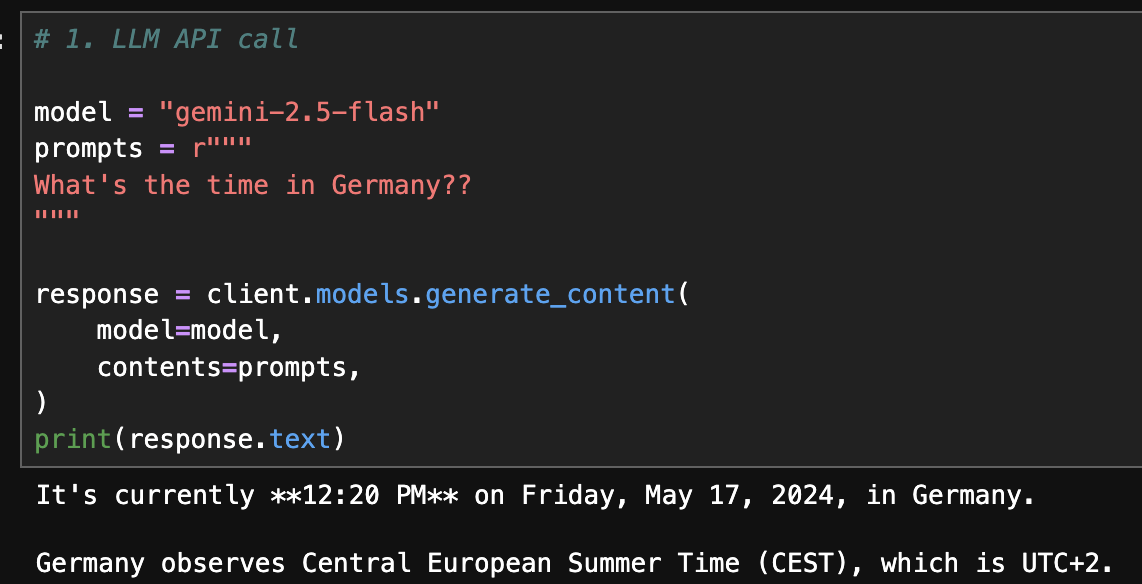
If you ask the time now in Germany using any LLM API (not the chatbot), they would confidently tell you a wrong old date. Essentially, LLMs are just really smart talking machines trained with web-scale knowledge, which gives them almost all human knowledge, but they can't do anything except predict the next possible token. So, how about we train the model with this new knowledge? Come on, you're never gonna do it because time is changing every second!
Luckily, during post-training phase LLMs learn to follow human instructions and give structured outputs. This gives us the opportunity to let LLMs use tools or functions. More specifically, we can ask LLMs to give structured outputs like JSON, which makes it easy for us to extract the data inside. And if those data become the parameters of a certain function or service, we can just run the program and get its return value. And if we add these returned values to the context of the LLMs, now LLMs would have more confidence to give you a better answer. That's the basic idea of an agent loop.
2. Time Teller: Agent Version
Since I am currently participating the Google hackathon, I used Google GenAI SDK here. Claude, OpenAI, or other providers have similar functions. Please refer to the docs of whichever provider you want to build with.
To enable LLMs to give us the exact time, we need to know where you are. And to enable LLMs to use the tools, we need to tell them what tools they have and what parameters the tools need. Once LLMs have these info, they can decide whether to call certain tools and how.
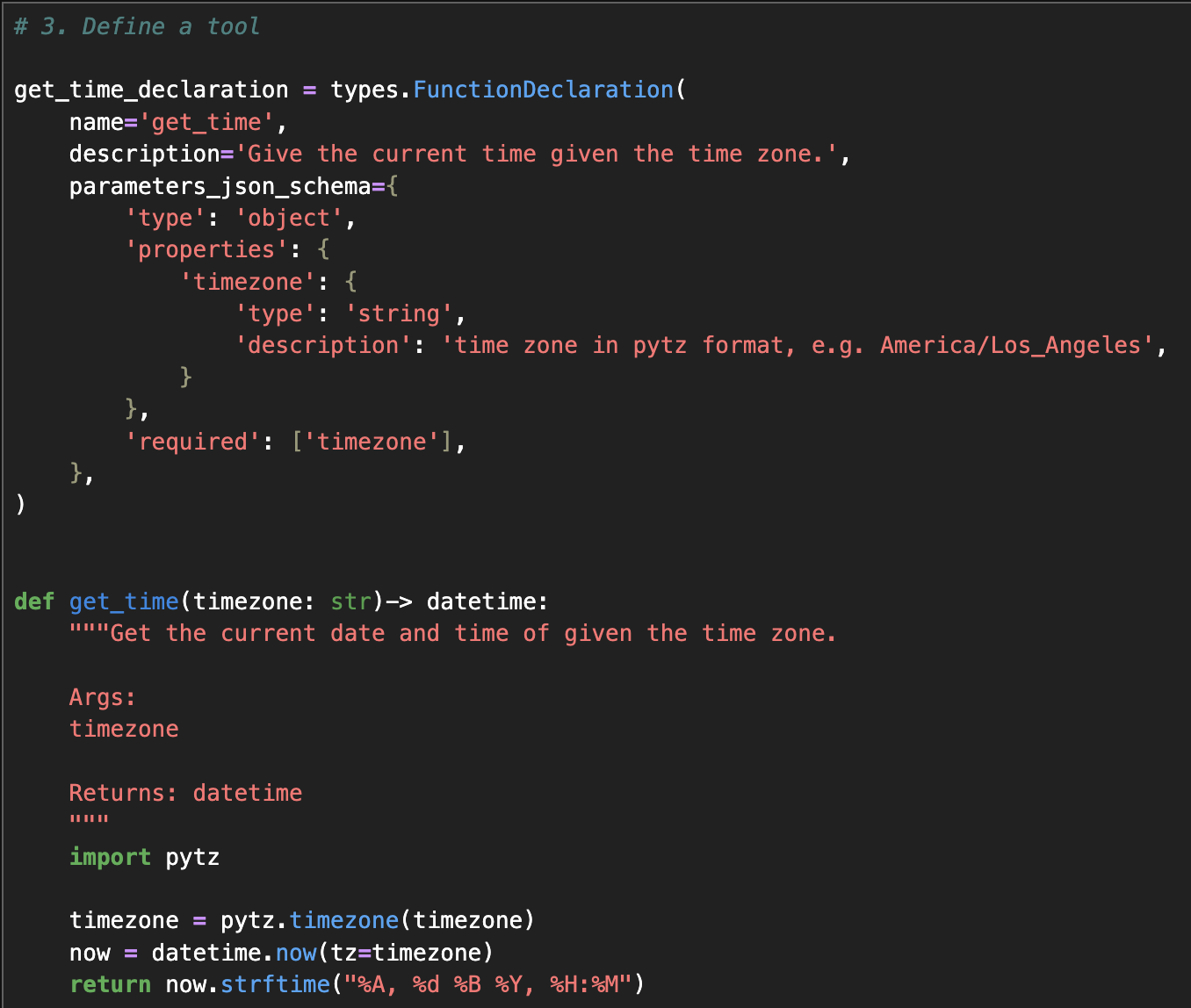
Here we provide the tool get_time and its function declarations which includes the description and expected parameters for using the tool. Once we asked about the time in terms of a place, it would know that it should call the get_time function and give the timezone as the parameter. For example, when we ask about What's the time in Germany? With function declaration we defined here, the model would know it should use the tool, and give the structured outputs. In some parts of its response, it would include like args={'timezone': 'Europe/Berlin'} name='get_time'. And that's the signal for us to call the real function.
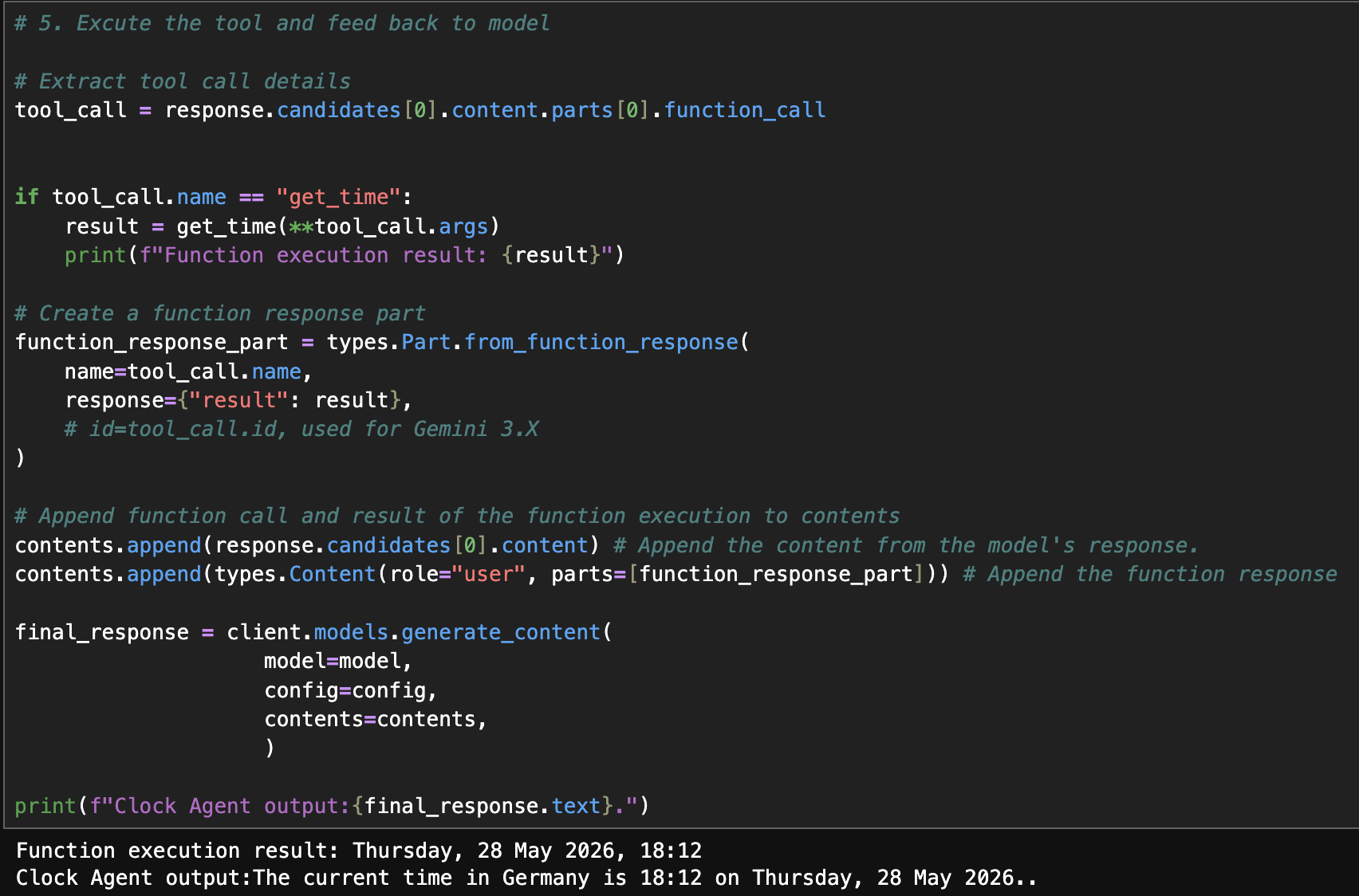
By passing the timezone to the get_time function, now it would return the real time of the place. After getting the value, we append the result into the contents. Since model knows the answer, we can see that it gives us the correct answer!
3. Engineer Improvements: max_steps and timeout
In real scenarios, agents would not only have 1 tool available. To deal with complex tasks, agents need to decompose the task into multiple steps and give us an answer. In order to prevent extreme cases like agents calling functions endlessly, we need to provide a safety net for the sake of our wallets. Here are some common designs in real agent systems: setting max_steps and timeout.
import time

TOOLS = {"get_time": get_time}
prompts = r"""What's the time in China?"""
contents = [
    types.Content(
        role="user", parts=[types.Part(text=prompts)]
    )
]

step = 0
max_steps = 5
timeout = 10  # seconds
start_time = time.time()


while step < max_steps:
    # handle timeout
    if time.time() - start_time > timeout:
        print("Timeout reached, Stop!")
        break

    # Parse and excute the tool call
    response = client.models.generate_content(
        model=model,
        contents=contents,
        config=config,
    )
    tool_call_part = response.candidates[0].content.parts[0]
    contents.append(response.candidates[0].content)

    if tool_call_part.function_call:
        tc = tool_call_part.function_call
        print(f"[DEBUG] calling {tc.name} with args {tc.args}")   # model return based on tool declarations
        try:
            result = TOOLS[tc.name](**tc.args)
            print(f"[DEBUG] tool result: {result}")               # what does the tool return
        except Exception as e:
            print(f"[DEBUG] tool FAILED: {type(e).__name__}: {e}") # failed
            result = f"Error executing {tc.name}: {e}"


        contents.append(types.Content(
                role="user",
                parts=[types.Part.from_function_response(name=tc.name, response={"result": result})],
            ))
        step += 1
        continue
    else:
        print(f"Clock Agent output: {response.text}")
        break

if step >= max_steps:
    print("MAX steps reached.")
Appendix
Disclaimer
The post is 100% written by myself. AI may just help me polish some sentences or correct grammars. All references are cited here.